Microsoft Visio (.vsdx)
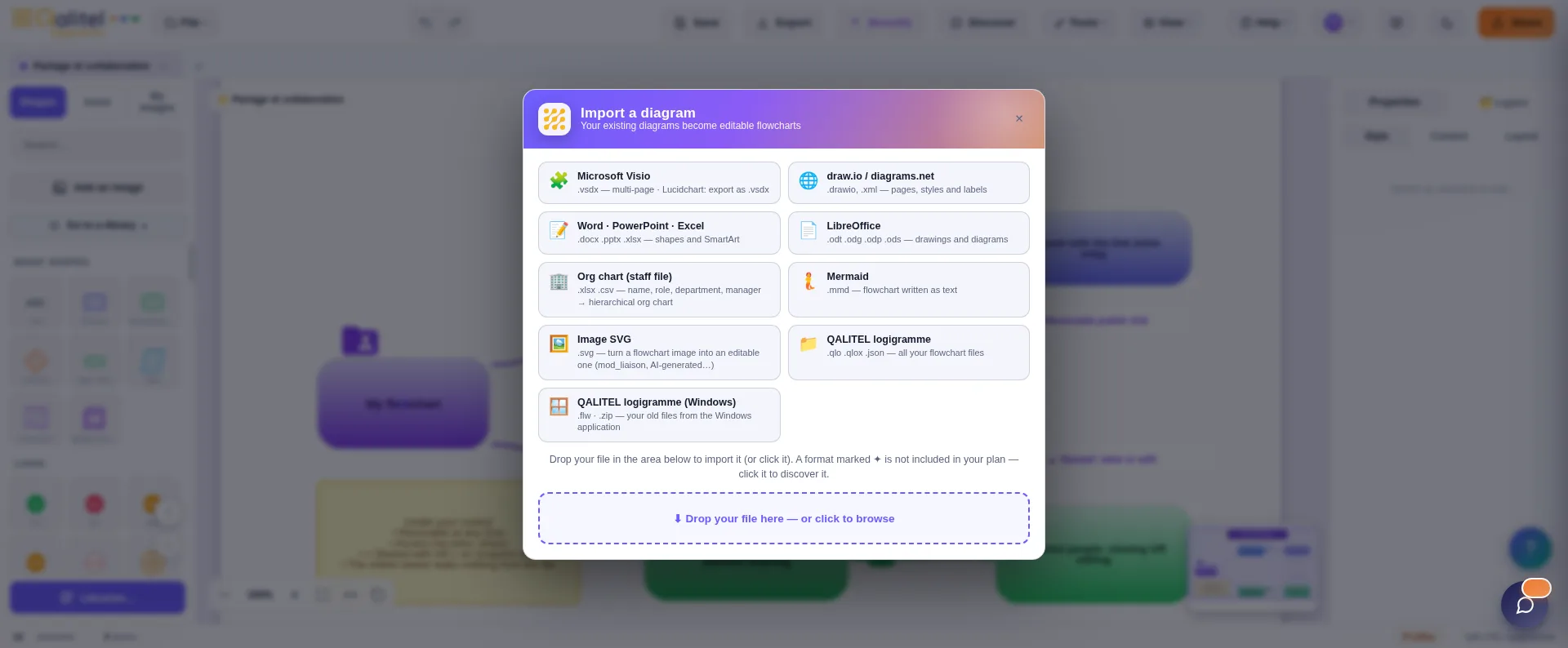
Multi-page import of your Visio files: each page becomes an editable flowchart. And Visio export exists too — the round trip is possible, you are locked into nothing.

Your diagrams already exist — in Visio, Lucidchart, draw.io, or scattered across Word and PowerPoint documents. QALITEL logigramme imports them and turns them into editable flowcharts: shapes, text and layout included. Migration is not a project, it's an import.
Multi-page import of your Visio files: each page becomes an editable flowchart. And Visio export exists too — the round trip is possible, you are locked into nothing.
Lucidchart exports to .vsdx format: your Lucidchart diagrams therefore import via this route, and become editable like the rest.
Import of .drawio and .xml files, with multiple pages, styles and labels. Your draw.io diagrams arrive just as you made them.
Do you describe your flowcharts in Mermaid text? Paste the code, and QALITEL logigramme turns it into an editable graphical flowchart.
The diagrams drawn in your Office documents — shapes AND SmartArt — import and become editable flowcharts. Years of diagrams buried in .docx files get a working life again.
Were you using QALITEL logigramme on Windows? Your .flw files and .zip archives import free of charge, right from the Free version. Everything you need to know about this migration.
Because the number one barrier to changing tools is your existing work — and here it falls away: your files import, they are not retyped. The rest are good reasons: a French publisher developing quality management software since 1993, your data hosted in France, a purchase with no compulsory subscription, and a Free version to judge for yourself before any decision — without even creating an account.
Visio, Lucidchart, draw.io, Mermaid and Office imports are available from the Pro version — which also exports your flowcharts to PNG, SVG and Visio.
Try QALITEL logigramme in your browser, with nothing to install — you can even try it without creating an account.