Writer
For your procedures, quality manuals and reports: the flowchart takes its place in the document and updates whenever the procedure changes.

Export your flowcharts to Writer, Calc and Impress in a single click: the flowchart placed in the document stays linked to its source — edit it in QALITEL logigramme, and it updates in the document. The free suite is entitled to the same living documents as Microsoft Office.
For your procedures, quality manuals and reports: the flowchart takes its place in the document and updates whenever the procedure changes.
For your workbooks and tracking sheets: the illustrated process lives alongside your data, with no need to reinsert it every time something changes.
For your presentations and training sessions: the projected version is always the flowchart version in force.
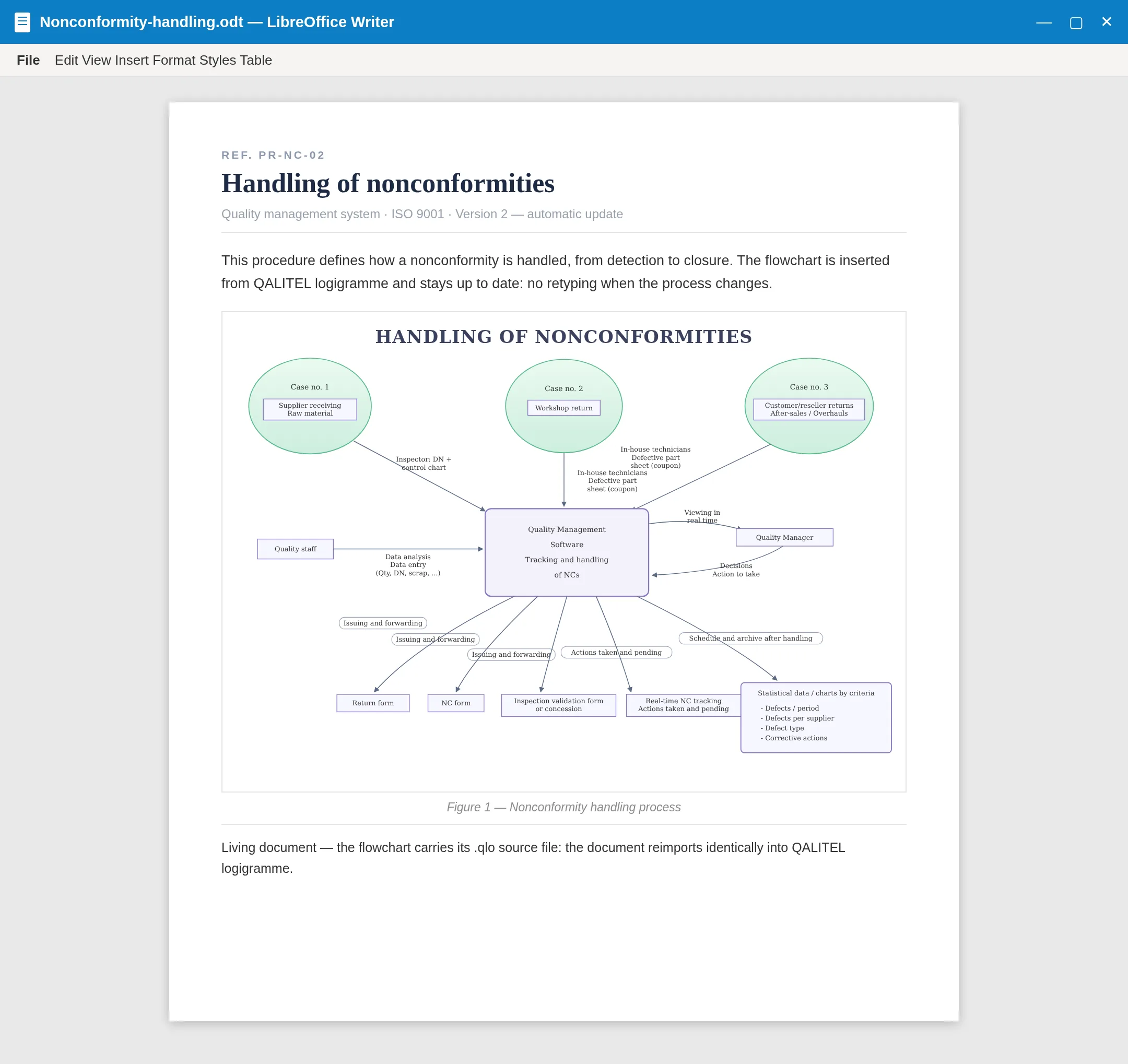
The document stays up to date. The flowchart placed in your Writer, Calc or Impress file stays linked to its source: edit it in QALITEL logigramme, and the document shows the up-to-date version, with no manual re-export.
The round-trip is lossless. Every export carries its source flowchart with it — the .qlo file is embedded in the document. So an exported document reimports identically into QALITEL logigramme, shapes, text and layout included.
The living Writer, Calc and Impress documents — like their counterparts Word, Excel and PowerPoint — are part of the ProAd version, with real-time sharing and co-editing.
Try QALITEL logigramme in your browser — you can try it without creating an account.